


My Invisalign is the kind of medical app I would keep close during orthodontic treatment because it focuses on the small moments that are easy to overlook: remembering what needs attention, documenting visible changes and finding guidance when a question appears between appointments. I found it less like a complete replacement for professional care and more like a practical companion for keeping treatment organized on a phone.
That distinction matters. The app does not turn a mobile screen into an orthodontist, and I would not use it to make clinical decisions on my own. Its value is in helping me stay engaged with the routine around Invisalign treatment. Developed by Align Technology Inc., it is a free app in the Medical category, available to an Everyone audience. Its average rating is 3.5 from around fifteen thousand ratings, with roughly one and a half thousand written reviews, while its install count has passed one million. Those figures suggest broad interest, but also a mixed experience that is worth understanding before downloading.
How My Invisalign Fits Into Everyday Treatment
When I think about the usual alternatives, I picture calendar reminders, a camera roll full of unlabelled photos, notes saved in different places and a clinic website opened whenever a question comes up. My Invisalign brings several of those treatment-related habits into one dedicated space. That does not automatically make it better at everything, but it gives the information a clear context: the app is built around the patient’s Invisalign journey rather than general scheduling or generic health tracking.
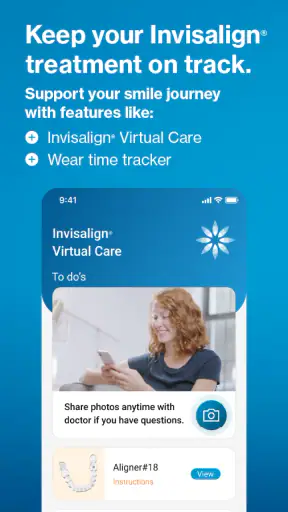
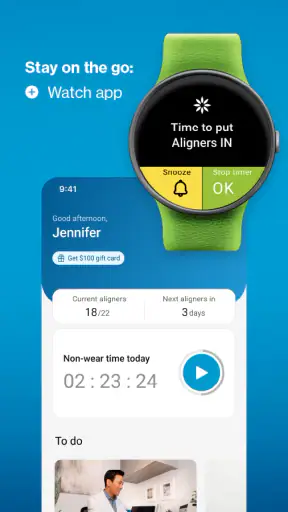
The most useful starting point is the reminder function. A reminder is easy to underestimate because it sounds simple, yet orthodontic treatment often depends on repeating ordinary actions consistently. I would use the app to create a visible prompt for a routine that tends to disappear into a busy day, especially when work, commuting or family responsibilities interrupt the usual schedule. The benefit is not that the app makes the action happen; it reduces the chance that I simply forget.
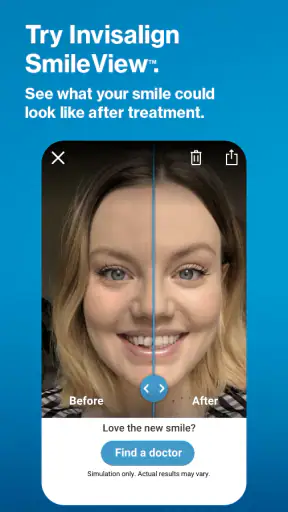
Progress photos are another reason I would choose this app over a normal camera application. A standard camera can take a picture, but it leaves me responsible for remembering when each image was captured and why it matters. Within a treatment-focused app, the purpose of the image is clearer. I can use photos as a personal visual record instead of relying only on memory or waiting for the next appointment to notice gradual changes.
That visual record is particularly helpful when progress feels slow. Day-to-day changes can be difficult to see because I look at my teeth constantly. Comparing photos taken under reasonably similar conditions can make the longer-term journey easier to understand. I would not treat those images as a diagnostic tool, but I would use them to prepare more precise questions for my orthodontist.
What requires a connection
The app’s most obvious connectivity-dependent moments are the ones involving answers and current account-related content. If I am searching for guidance, opening an explanation or relying on information that needs to be retrieved from the service, I would expect the phone to need a working connection. That is not a criticism by itself; it is simply important to recognize that a treatment companion can feel very different when the network is weak.
At home on a reliable connection, the experience should feel straightforward: open the app, check what needs attention and continue. In a basement, on a train, in a crowded clinic waiting room or in an area with poor reception, I would be more cautious about assuming every screen will behave identically. I would not plan an urgent treatment question around the expectation that the app will always be reachable.
This is where My Invisalign differs from a paper instruction sheet or a note saved directly on the phone. Paper and local notes are immediately available in places where a network is not. Their weakness is that they can become outdated, incomplete or difficult to organize. The app is more convenient for an ongoing digital workflow, but that convenience is tied to the conditions under which its connected parts can load.
My practical advice is to look through the information you are likely to need before leaving home, particularly if you are traveling to an appointment or spending the day somewhere with unreliable reception. I would also keep the clinic’s normal contact route available separately. An app can support communication and preparation, but it should not be the only path for a concern that needs professional attention.
Using it in real mobile situations
The phone-first design makes sense for treatment routines because the phone is usually nearby when reminders matter. I can imagine checking it while getting ready in the morning, reviewing a prompt during a lunch break or taking a progress photo when I have enough privacy and consistent lighting. These are realistic moments, not special “app time,” and that makes the tool more likely to become part of a routine.
Progress photography deserves a little discipline. I would avoid taking every image in a different room, under a different lamp and from a completely different angle. That creates noise that can make comparison less useful. A better personal workflow is to choose a comfortable place, use a similar angle and take photos at meaningful intervals rather than constantly checking for tiny changes. The app can help store the record, but the quality of the comparison still depends on how I capture it.
Privacy also affects where I would use the camera features. A bathroom mirror may be convenient, but it may not be the best setting if other people can see the screen or if the phone is shared. I would use a private space, check the image before saving it and avoid treating the phone gallery or app as a place for casual sharing. Dental progress images are personal even when they do not feel as sensitive as other medical records.
For reminders, I would choose prompts that fit my real day instead of creating an ambitious schedule I will ignore. One carefully placed reminder can be more useful than several alerts that become background noise. If my routine changes on weekends, travel days or school holidays, I would review the timing rather than blaming the app when the prompt arrives at an inconvenient moment.
These details are where my experience of the app would be decided. A reminder system is only helpful when it matches behavior, and a photo timeline is only informative when the photos are comparable. My Invisalign provides the structure, but I still need to build a routine that feels natural.
When the connection fails
A good test of any connected medical companion is not how it behaves on a perfect home network, but what I do when something goes wrong. If a page does not load, I would first check whether the issue affects only this app or the phone’s wider connection. Moving from a weak signal to a stable Wi-Fi network, closing and reopening the app, and checking whether the current version is installed are sensible first steps.
The current version is 6.8.1, and the app supports devices running iOS 9 or later. I would keep the software environment reasonably current where possible, because older operating systems, device storage pressure or interrupted updates can create friction that looks like an app problem. I would also avoid repeatedly tapping a control when a network request appears stuck; that can make it harder to tell whether an action completed.
If a reminder does not appear, I would check the phone’s notification settings and the app’s own reminder configuration before assuming the feature is broken. A silent phone, a focus mode or a changed schedule can interrupt an otherwise normal setup. This is one reason I prefer not to rely on a single digital prompt for something important. The app can be the main nudge, while a simple backup habit keeps the routine from depending entirely on one alert.
For progress photos, I would take care not to create duplicate entries during a failed upload or slow response. First I would confirm whether the image actually appeared in the relevant area, then retry only if necessary. Keeping the original image temporarily on the phone can be useful during troubleshooting, but I would remove extra copies later if I do not need them. That approach reduces confusion without turning the camera roll into a second, disorganized archive.
Questions require the most caution. If an answer area is unavailable, I would wait for a stable connection and try again rather than filling the gap with a random search result. For anything involving pain, an unexpected change or a concern that feels urgent, I would contact the orthodontic practice directly instead of treating an app delay as permission to wait.
Being thoughtful with personal treatment information
Because this is a medical app, I would use it with more care than a casual lifestyle tracker. I would choose a device lock, avoid leaving the app open where someone else can read it and think carefully before sharing screenshots. Even a reminder or progress image can reveal more about a person’s treatment than they intended.
I would also separate convenience from record keeping. The app is useful for organizing my own treatment experience, but I would not assume that every photo or note replaces the records held by my dental professional. If an image is important for a discussion, I would be ready to show it during an appointment or explain when it was taken. A personal timeline becomes more useful when it supports a conversation rather than trying to stand in for one.
Connectivity has a data-conscious side as well. I would prefer to review guidance over a trusted connection, especially when I am handling personal treatment information. On mobile data, I would be aware that repeated photo activity or loading rich content may be less convenient than doing the same thing at home. I would not invent a strict data-saving routine, since the right choice depends on my phone plan and how the app behaves on my device, but I would avoid unnecessary repeated uploads and refreshes.
Another useful habit is to keep the app’s purpose narrow. I would use it for reminders, progress documentation and treatment-related answers, not as a general health diary. That makes the information easier to interpret and limits the amount of personal material gathered in one place. If I stop treatment or no longer need the app, I would review what I want to retain on the phone before removing it.
Who will appreciate it most
I think My Invisalign is best suited to someone who wants a dedicated treatment companion and is comfortable using a phone as part of a healthcare routine. It should appeal to people who forget small tasks, like seeing visual progress, or prefer having treatment guidance organized around Invisalign rather than scattered across notes and browser bookmarks.
It may also help a person who feels discouraged by slow visible change. A carefully maintained photo record can provide perspective between appointments. The important word is “carefully”: the app cannot create progress, and a photo comparison cannot explain why a result looks different from one image to the next. Its strength is helping me observe and prepare, not giving me a clinical verdict.
I would be less enthusiastic about it for someone who wants a fully independent orthodontic service, a replacement for appointments or a broad medical record system. It is not the right choice if the main need is emergency advice, detailed professional interpretation or a tool that works as a universal health organizer. In those cases, direct contact with the clinic or a broader health solution may be more appropriate.
The mixed average rating also sets a realistic expectation. A medical companion can be genuinely useful while still frustrating some users through login issues, device differences, notification behavior or moments when a connected screen does not respond as expected. I would download it because its functions are relevant to Invisalign treatment, not because I expect a flawless experience on every phone and every network.
My final view on staying connected
After looking at how it fits into real routines, I see My Invisalign as a focused helper rather than an all-purpose medical app. Its strongest idea is bringing reminders, progress photos and treatment guidance into the same patient-oriented space. That combination is more useful than each feature considered in isolation: a reminder supports consistency, photos support reflection and answers support preparation for the questions that arise between appointments.
The trade-off is that the connected experience needs sensible backup habits. I would review important guidance while online, keep the clinic’s contact details available through another route and avoid making urgent decisions based only on what appears on the screen. I would also take photos consistently, protect the phone and treat reminders as support rather than a guarantee.
For a free app from Align Technology Inc. that has been available since February 2018, it remains easy to understand why many Invisalign users would try it. The app is aimed at Everyone, and the basic workflow is approachable even if the treatment itself is more involved. I would recommend My Invisalign to a current patient who wants a simple digital routine and understands the limits of app-based guidance.
My recommendation is more cautious for anyone expecting offline certainty, instant clinical answers or a substitute for a professional relationship. When the network is dependable and the user treats the app as an organizer, it can make treatment feel more manageable. When the connection fails or the question is medically important, the best experience comes from switching to a reliable backup rather than forcing the app to do a job it was never meant to replace. In that role, My Invisalign is useful, practical and worth trying, provided I use it as a companion to care rather than care itself.


